Working a ticket
A cook works the board one row at a time. Each row's status pill is the button: it tells you where the dish is and what the next tap does.
The pill is the button
The pill reads the dish's state, a count when rows are grouped (×3), and the verb for the next tap (· Plate). Tap it and the dish moves one step. The steps a dish goes through:
| Pill reads | Meaning | Tap does | Then |
|---|---|---|---|
| Ordered · Start | A web order the kitchen has not started | Start | Preparing |
| Sent · Claim | Sent by the waiter, nobody has it (two-stage bump only) | Claim — your name goes on the row | Preparing |
| Preparing · Plate | On the grill | Plate | Ready |
| Recalled · Plate | Sent back to be re-cooked | Plate | Ready |
| Ready · Serve | Plated, waiting for a runner | Serve | Served |
| Ready to collect · Serve | Released by the pass | Serve | Served |
| On hold · Resume | Paused by a cook | Resume | Preparing |
| Held | Belongs to a course the pass has not fired | nothing — the pass fires the course | — |
| Served, Cancelled, Voided, Paid | Finished | nothing | — |
On an Expo screen the pill is read-only: the pass releases courses and tickets, the station that cooks moves its units (hover for the reminder). On a prep screen the pill is also read-only for a moment after a reload, until the stations have loaded.
Whether a sent dish reads Preparing straight away or waits as Sent · Claim is a location setting in SSP Manager — KDS settings. With two-stage bump on, the screen separates "on the ticket" from "on the grill", the cook's name goes on the row, and the unstarted alarm works for waiter-sent tickets as well as web orders.
Changing your mind
Start, Plate and Serve do not send immediately. The row pulses, shows a countdown (2s for Start, 5s for Plate and Serve) and a red ✕. Tap the ✕ to cancel — nothing is sent. Once the countdown ends the change goes to the server, the waiter's screen updates, and a plated dish may tell a web-order guest their food is ready; there is no undo past that point except a Recall.
Claim and Resume send straight away; both are harmless to repeat.
If the server refuses the change — the dish was cancelled meanwhile, the account lacks the ability, the order was already paid — the row snaps back to what it was and a red message gives the server's reason.
Several of the same dish
Identical rows — same dish, same modifiers, same state — are grouped: the row reads 3 × and one tap moves all three at once. Tap the 3 × to split them; each row then reads 1/3, 2/3, 3/3 and moves on its own. Once their states match again they regroup by themselves. Use the split when one plate is ready and the others are not.
Rows with a quantity that was changed after the ticket was sent carry an amber 2 → 3 chip (Quantity changed after it was sent).
Hold and resume
Open the row's sheet (tap the dish name) and choose Put on hold to pause a dish that is Sent, Preparing or Recalled — the guest asked to wait, the fryer is down. A held dish has no clock and never counts as late. Resume it from the same sheet or from the pill. A hold reason entered by the waiter shows on the row as on hold — reason.
Recall
A dish that was plated or served by mistake has a rotate button on its row:
- Recall to re-cook — from Ready back to Preparing.
- Recall to re-serve — from Served back to Ready.
Recall sends immediately, with no countdown, and is available on the Expo screen as well. The waiter's screen follows.
Line timers
While a dish is Preparing, the row shows a countdown to when it should be ready: 03:20 remaining, then +01:15 once late (+2h 15m past an hour). The countdown starts when the dish was claimed (or started, without two-stage bump) and is due after the dish's prep time — stretched by the station's current load when Kitchen Capacity is configured, or the server's own estimate when it has one.
| Row reads | Meaning |
|---|---|
Plain 03:20 | On time |
| Amber with a clock icon | Inside the station's early-warning window (Warn before ready in Manager; off unless set) |
| Red with a warning icon | Past due |
| Red and pulsing | Past due by more than the station's grace period — this is the moment the overdue alarm sounds |
04:12 elapsed | No prep time is set for this dish, so the screen can only count up. It never alarms |
03:20 est | Based on the dish's prep time only — kitchen load is not configured for this station |
A Sent dish waiting to be claimed, or a plated dish waiting for a runner, is coloured by the location's warn / overdue thresholds instead (KDS settings): its pill gets an amber ring, then a pulsing red one. The server colours lines too, and the screen always shows whichever of the two is worse, so a tablet with a drifting clock cannot hide a late dish.
The item sheet
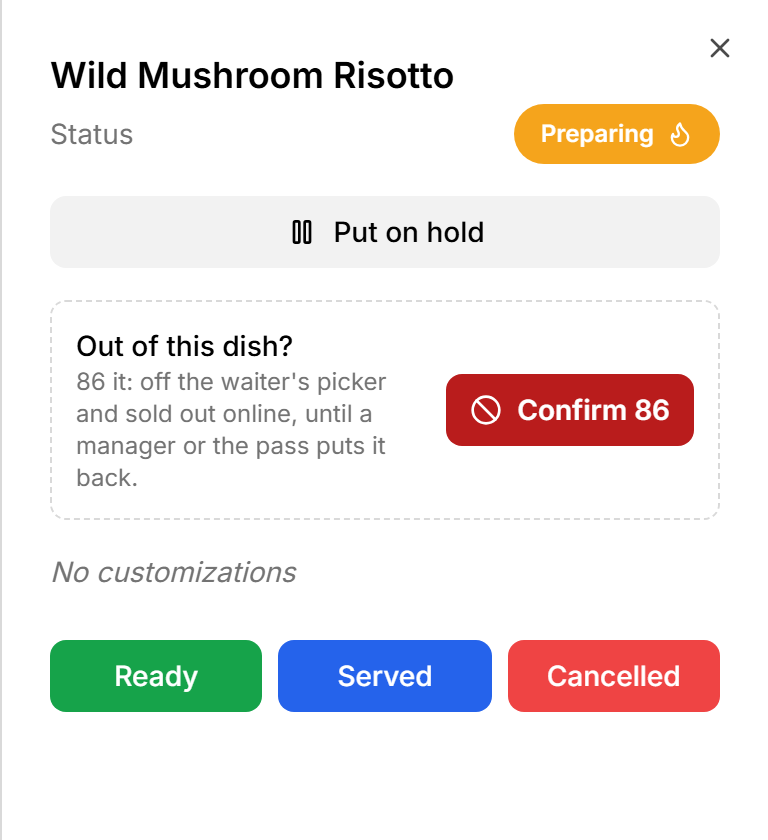
Tap the dish name (not the pill) to open the sheet for that row:
- Status — the current state.
- Put on hold / Claim / Resume — prep screens only, see above.
- 86 — see below.
- Customizations — every modifier, with its price when it has one.
- Quick actions — one button per state the server will accept right now (Preparing, Ready, Served, Cancelled …). These send immediately, with no countdown, and close the sheet. They are the way to cancel a single line from the kitchen, and the way to skip a step when the pill's single step is not what you need.
- Recall to Re-cook / Recall to Re-serve when applicable.
86 a dish
When the kitchen runs out of something, open the dish's sheet and find Out of this dish? Tap 86; it turns red and reads Confirm 86 for five seconds. Tap again to confirm. The dish is marked unavailable for the whole location, live: it disappears from the waiter's picker and shows as sold out on the online menu. The confirmation reads Burger is 86'd — off the waiter's picker and sold out online.
Putting the dish back on is done in SSP Manager (the item's availability), not from the KDS. Tickets already carrying the dish are unaffected — cook what is on the board.
The 86 button is on every screen, Expo included; the account needs the eighty_six_menu_items ability or the tap is refused.