Courses and the Expo screen
A coursed ticket is a ticket where the waiter decided what goes out when: starters now, mains held. The KDS shows every course on every screen, but only the Expo screen — the pass — fires and releases them, and only the screen that owns the ticket closes it.
How a coursed ticket looks
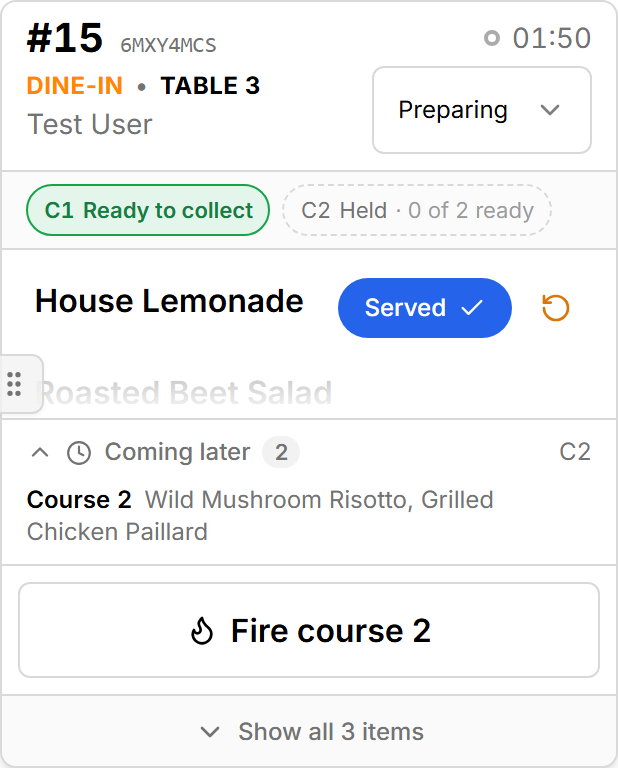
The chip row under the header reads one chip per course, in order:
| Chip | State | Meaning |
|---|---|---|
| Dashed, C2 Held | Held | Not fired yet. Its dishes sit under the ticket in Coming later |
| C1 Sent · 0 of 3 ready | Sent | Fired; no plate up yet |
| C1 Preparing · 1 of 3 ready | In kitchen | On the grill |
| Green border, C1 Ready · 3 of 3 ready | Ready | Every plate up, waiting at the pass |
| Filled green, C1 Ready to collect · released | Released | The pass sent it to the runner (or texted the diner) |
| Dimmed, C1 Served · 3 served | Served | Done |
The current course — the first one not served — is bold. Hover a chip for the exact count.
Who fires a course
A held course goes to the kitchen in one of three ways:
- The waiter fires it from the Waiter app, usually when the table is ready for the next course.
- The pass fires it from the Expo screen with Fire course N.
- A pre-order fires on its own at the time SSP computed from the dish prep times, so it is ready for the requested pickup.
Until then its dishes are Held: no clock, no alarm, not tappable, counted in All day only with the Include held courses switch on.
Expo screen controls
These buttons appear in the ticket's footer on an Expo screen only. A location without an Expo station never shows them — courses there are fired by the waiter.
Fire course N
Shown for the first held course that still has unplated dishes. Sends its dishes to the stations exactly as the waiter's fire would; they appear as Sent (or Preparing) on the prep screens. The server refuses to fire a pre-order's course before its time — the KDS cannot "start early"; the waiter can.
Needs the submit_orders ability.
Release course N
Shown, green, for each course whose every live dish is Ready. Releasing turns them Ready to collect — the sign to the runner that the course can go, and at a web-order location the moment the diner is texted your order is ready. Serving a dish does not require the release; the release is the pass saying "take it".
Release to runner
The same action for a ticket without courses, shown when everything on the order is ready and at least one dish has not been released yet.
Closing a ticket
Three controls close or re-stage a ticket as a whole. They sit on the screen that owns ticket completion: the Expo screen when the location has one; otherwise All Stations and every prep screen (see Screens and views).
Mark Ticket Ready
Sets the whole order to Ready in one tap. Shown only when every line on the order is plated, nothing is held, and the order is not already Ready or finished. It is the pass's "this table is up".
The status dropdown
Under the ticket clock. Sets the order's status directly — Ordered, Preparing, Ready, Served, Paid, Cancelled, Completed and the rest — and cascades to every dish on the order: setting the order to Served marks every line served. The confirmation says how many lines followed (4 items cascaded). The dropdown is disabled while a change is in flight; if the server refuses, it springs back to the previous status with the reason.
Use it to close a ticket the waiter forgot, or to cancel a whole order the kitchen has been told not to make. Prefer the per-line controls for anything less than the whole ticket.
Complete Order
Green, shown when every dish on the order is served, paid or completed. Marks the order Completed and takes it off the Active board. The waiter can close a ticket too; whichever side does it first wins and the other sees it go.
Ready for handoff
Whatever the screen, a ticket with nothing left to cook across every station leaves the grid for the collapsed Ready for handoff strip under the board. On a prep screen that means "not yours any more"; on the Expo screen it is the queue for the runner.
What the waiter sees
Every step above reaches the Waiter app within a second: dish states on the ticket, course chips, a released course, the ticket closed. A waiter who sees Ready on their screen is seeing the cook's tap; a cook who sees a dish turn Held or a quantity chip appear is seeing the waiter's edit.