Courses
Courses let a table eat in order: starters first, mains once the starters are cleared, dessert after. The waiter sets the order; the kitchen cooks what has been fired and keeps the rest held; the pass releases each course to the runners.
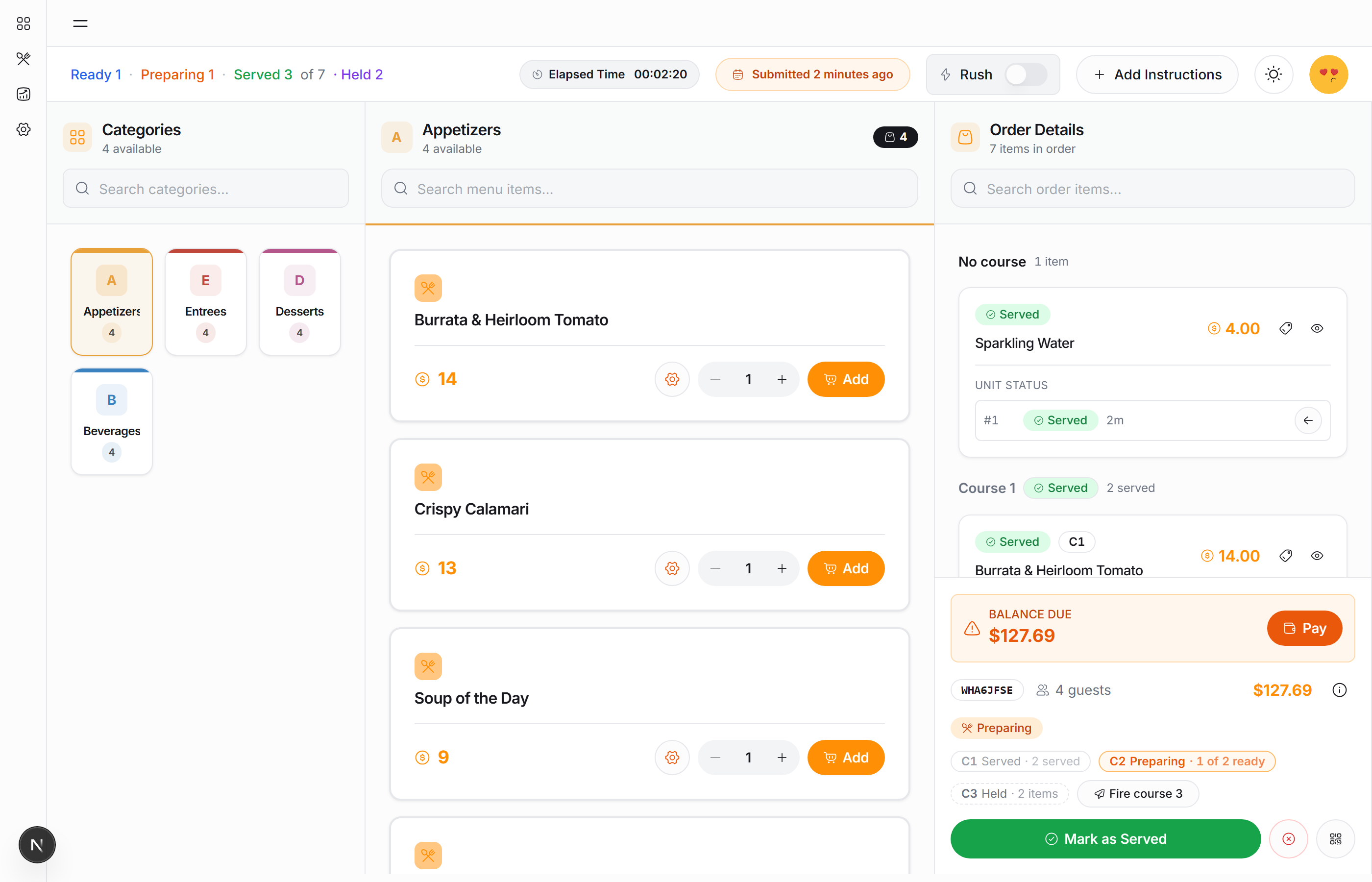
Putting an item in a course
While an item is still unsent, its row carries a Course picker. Choose Course 1, Course 2… or No course. The picker always offers one number more than the highest in use, so you can add a course after the last.
Once any plate of the item has reached a station the picker is gone: the server refuses to move food that is already cooking.
An item with No course is sent when you submit, before course 1.
The courses strip
Above the action buttons, a chip per course says where it is:
| Chip reads | Meaning |
|---|---|
C2 Held · 1 item (dashed) | Submitted, waiting to be fired |
C1 Sent · 0 of 3 ready | In the kitchen; the count is plates ready |
C1 Ready · 3 of 3 ready | Every plate is plated |
C1 Ready to collect (green ring) | The pass has released it to the runners |
C1 Served · 3 served | On the table |
The chip of the course the kitchen is on is drawn bold. Course numbers are the eating order; C1 is eaten first.
Firing a course
Course 1 is fired when you submit the order. Every later course waits until you (or the pass, on the Expo screen) fire it:
- Fire course N in the courses strip, or
- Send in the heading of that course further down the page, or
- Fire CN on the order's row in the Orders list.
Only the next held course is offered. Firing course 3 before course 2 is not something the buttons make easy.
Firing needs the submit_orders ability, the same one that submits the order.
After the first course goes out, held items are not re-offered as Send New Items. That button appears only for items that are actually unsent.
Course headings on the order page
On a coursed order the items are grouped under one heading per course, in eating order, with items in no course first:
Course 1 · Sent · 0 of 3 ready
Each heading carries the two things you do to a course as a whole:
| Button | Appears when | Does |
|---|---|---|
| Send | this is the next held course | fires it |
| Serve (n) | the kitchen has plates of this course (cooking or plated) | marks every one of them served in one tap |
Plates, one at a time
A line of three burgers is three plates on the server, and they can differ: one sent back, two on the table. Under the line, 3 units — set each individually lists them with their own status and their own controls (serve, cancel, recall). The status word comes from the kitchen: Sent, Preparing, Ready, Ready to collect (highlighted green), Held.
A held plate has no forward control; it is released by firing its course.
What the kitchen sees
Everything here is mirrored on the KDS within a second or two: held courses sit under the ticket as Coming later, the Expo screen releases a plated course, and Ready to collect lights up here when it does. See Courses and the Expo Screen.
Keeping the page fresh
Updates arrive live over the location's private channel. As a backstop the order page re-reads itself every 30 seconds and the orders list every 60 seconds, so a dropped connection never leaves a plate stuck on Preparing for long.